Know what your CSS actually uses
A guide to panda analyze, for teams who want to clean up their Panda setup without breaking anything.

An interlude in the Panda internals series, between part 6 and part 7. A side episode: the parts so far explain how Panda works, and this one is about a tool that helps your team use it well. There's a kit at the end to take with you: an agent skill, rules for your AGENTS.md, prompts, and a CI check.
Every Panda project grows a little extra over time. A token nobody uses anymore. A recipe variant from a redesign. A keyframe someone added for one animation and then removed the animation. A hex code that should have been a token.
None of that breaks the build. So it stays, and nobody notices. Deleting things is no safer: remove a token your app still uses and the build won't fail either. Panda writes color: brand\.500 into the CSS as-is, the browser ignores it, and the page quietly loses its color.
Why it matters more now
A lot of styling code is now written by agents, and an agent learns your design system from what's already there.
It reads your code first. Claude Code's best practices put it plainly: "Claude starts every task by reading your code", and it picks up "your conventions" and "how existing components are built". To an agent, a #6366f1 sitting in a component looks like a convention. The next component it writes gets one too.
It reads your theme as a list of options. Whether an agent opens your panda.config.ts or asks Panda's MCP server for your tokens, it sees every token you've defined. Not the ones your app uses, all of them. A token nobody has touched in a year looks just as valid as brand.500, unless you've deprecated it. The same goes for recipe variants. If size.sm is defined, an agent has every reason to use it.
The same Claude Code page suggests writing down "an old pattern that's everywhere but that new code must not copy". That works, but the cleaner fix is to not have the old pattern. Every unused token you remove and every hard-coded value you replace is one less wrong example for the next agent, and for the next person.
panda analyze tells you what your app actually uses. This post walks through the questions it answers, with real output from a small app.
The example app
Say we have an app with a heading, a paragraph and two buttons:
export function App() {
  return (
    <Stack gap="4" p="6">
      <h1 className={css({ color: 'brand.500', fontSize: 'xl' })}>Welcome</h1>
      <p className={css({ color: '#6366f1', padding: '16px' })}>Get started</p>
      <Button size="md" tone="solid">Go</Button>
      <Button size="md" tone="ghost">Later</Button>
      <span className={css({ animation: 'spin' })} />
    </Stack>
  )
}
A second file turns the button recipe into a component:
export const Button = styled('button', button)
The recipe lives in the config, with size: sm | md | lg and tone: solid | ghost. There's also a brand color palette, a spinSlow keyframe, and one line of globalCss.
Start with the summary
Run it in the app:
panda analyze --limit 5
analyze: scanned 2 files
Summary
tokens         10 uses, 8 unique
recipes        3 uses, 1 unique
utilities      15 uses, 11 unique
patterns       1 uses, 1 unique
keyframes      1 uses, 1 unique
compositions   0 uses, 0 unique
Then you get one table per section: tokens, recipes, utilities, patterns, keyframes, and compositions (text styles, layer styles, animation styles). --limit caps how many rows each table shows. --scope tokens (or recipes, keyframes, and so on) prints just one section.
The rest of this post is the questions you'd actually bring to it.
"Is this token safe to delete?"
Tokens are grouped by category (trimmed to four rows):
Category     Used            Top tokens                                     Raw values   Files
colors       3/292 (1.03%)   brand.500 (2), gray.900 (1), transparent (1)   1            1
spacing      2/36 (5.56%)    4 (2), 6 (1)                                   1            1
animations   1/4 (25.00%)    spin (1)                                       0            1
fontSizes    1/14 (7.14%)    xl (1)                                         0            1
If you're counting along, the app only writes brand.500 and spacing 4 once each, and never writes transparent. The other uses come from the button recipe's own styles: its base uses brand.500 and px: '4', and the ghost tone uses transparent. Analyze counts the bodies of recipes your app uses, once per recipe.
Two things to look at.
The percentage. 3 of 292 colors is a small app on a big preset, which is expected. In a real design system, a category at 12% used is a palette you can shrink.
gray.900. No file in the app uses it. It's used by globalCss:
globalCss: { body: { color: 'gray.900' } }
Analyze counts your config as well as your source files. globalCss and staticCss count, and so do the bodies of recipes your app uses, like the button recipe above. So a token that only appears in globalCss won't show up as unused, and you won't delete it by mistake.
Once a name shows zero uses, the next step depends on how many apps use your theme:
- Zero uses in every app: remove it.
- Still used somewhere, but you want it gone? Deprecate it first, so those apps get a warning before it disappears.
"Which recipe variants does anyone use?"
Recipe   Variants       Top variants                                  Used in   Used as
button   3/5 (60.00%)   size.md (2), tone.ghost (1), tone.solid (1)   2 files   jsx 67%, fn 33%
size.sm and size.lg never show up. Every button in the app is md. If that holds across your apps, those two variants are dead weight in the recipe.
"Used as" splits the two files: the <Button> tags count as JSX, and the styled('button', button) line counts as a function call.
"Where did this hard-coded value come from?"
The paragraph has two values that aren't tokens: #6366f1 and 16px. That's the Raw values column in the tokens table. The JSON report shows what Panda matched them to:
panda analyze --json | jq -c '.views.tokens.categories[].rawValues[]'
{"prop":"color","value":"#6366f1","uses":1,"files":1,"suggestions":[{"token":"brand.500","semantic":false,"conditional":false}]}
{"prop":"padding","value":"16px","uses":1,"files":1,"suggestions":[{"token":"4","semantic":false,"conditional":false}]}
#6366f1 is exactly brand.500, and 16px is spacing 4. Someone wrote a value the theme already had a name for. When the brand color changes, the token updates and this paragraph doesn't. That's the kind of bug that's easy to ship and annoying to find later.
Treat this list as a to-do list. Each entry already has the token it should be.
A raw value only makes the list when Panda finds a matching token. A one-off 13px with no matching token isn't flagged.
"Where is this used?"
The JSON has a flat usages list with the file, line and column of every use in your source. Names in usages carry their category, so brand.500 from the table is colors.brand.500 here:
panda analyze --json | jq -r '.usages[] | select(.name == "colors.brand.500") | "\(.file):\(.line)"'
That's the question you ask before renaming a token, or when you want to know which screens a change will touch. Uses from your config, like gray.900 in globalCss, aren't in usages. They're listed on each name's entry in the tables instead.
"Why is this keyframe still here?"
Keyframes   1/5 used (20.00%)
Keyframe   Uses   Used in
spin       1      via animations.spin
Unused (4): bounce, ping, pulse, spinSlow
The app never wrote spin as a keyframe. It wrote animation: 'spin', which is the spin animation token, and that token points at the spin keyframe. So the keyframe shows via animations.spin. Delete it and the animation token breaks, even though no file names it directly.
spinSlow is the one this app added and then stopped using. That's the one to remove.
"Give me the list for the PR"
--unused skips the tables and prints only the names nobody uses, one per line, with no cap:
panda analyze --scope keyframes --unused
bounce
ping
pulse
spinSlow
Paste that into a cleanup PR, or save it and diff it against next month's run to see what's become unused since.
For anything you want to keep or script, --outfile report.json writes the full report and still prints the tables. --json prints the report instead of the tables.
"Why is my style missing?"
Analyze reads your files the same way the build does. It finds your Panda calls and works out their values without running your code. So if analyze can't see a value, the build couldn't either, and there's no CSS for it.
Say a component does this:
<button className={button({ size: 'lg', tone })} />
size.lg counts. tone comes from a prop, so Panda can't know which tone it is, and nothing counts for it. If one of the tones has no CSS in your stylesheet, this is why. Panda never runs your code covers what Panda can and can't follow, and how to write values it can see.
A quick check: if a name you know you wrote is missing from usages, Panda didn't see it.
Seeing it all at once
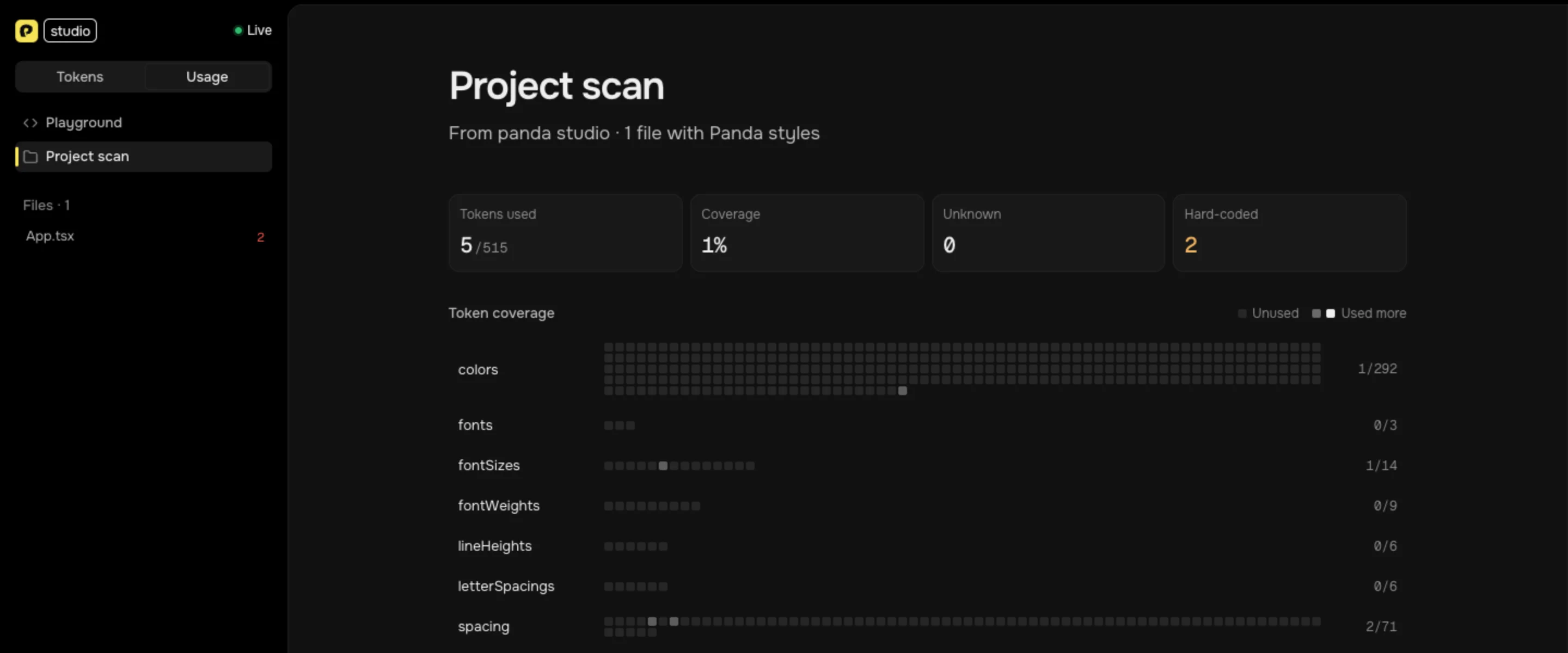
For a visual version, open the Usage page in Panda Studio. There are two ways in:
panda studioruns a local server that rescans as you save.- Studio's Usage page can open a
report.jsonyou made with--outfile. Same data, no server.
Here's the example app in panda studio. Every square is a token, and the lit ones are the ones your files use:
Further down are the most used tokens, with a swatch for colors, and the hard-coded values, each next to the token it should be:
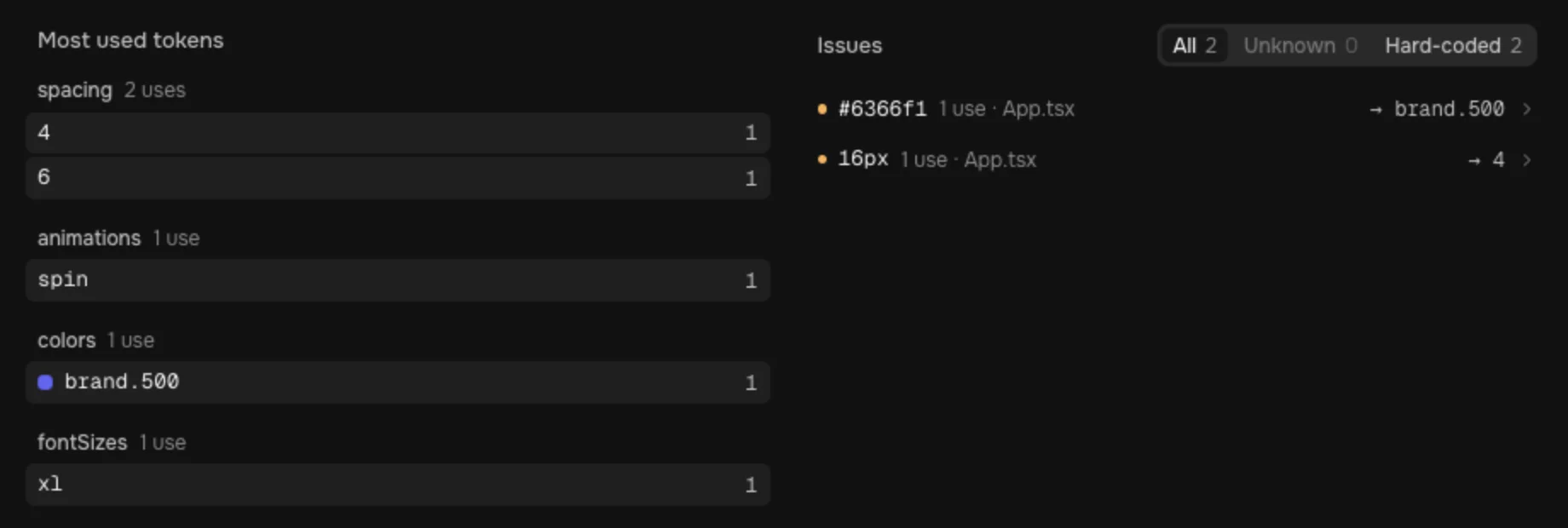
Either way, Studio shows only the uses in your source files. The report has the config uses too, but Studio doesn't draw them, so its numbers are smaller than the terminal's. gray.900 from globalCss and the button recipe's own styles don't light up here. It also flags token names that don't exist in your theme, like a typo such as bleu.500, as Unknown.
Let your agent run it
Cleanup is a good task to hand off, and an agent doesn't need anything special to do it. It can run the same command you would:
panda analyze --json
The JSON has the counts, the unused names, the raw values with their suggested tokens, and the file and line of every use. That's enough for an agent to replace each hard-coded value with its token, or to check that a token is unused before deleting it. It gets the same answer you'd get, so it doesn't have to guess.
If you already use Panda's MCP server, the same analysis is there as a tool, get_usage_report. Ask "Which tokens aren't used in this project?" and the agent calls it instead of the CLI. Either way works.
Make it a habit
panda analyze tells you what's already there. Lint stops the mess from coming back.
Lint while you write. @pandacss/eslint-plugin runs on Panda's own compiler, so it knows your actual theme. It works with ESLint and Oxlint. This site runs it through Oxlint:
{
  "jsPlugins": ["@pandacss/eslint-plugin/oxlint"],
  "rules": {
    "@pandacss/no-invalid-token-paths": "error",
    "@pandacss/prefer-token": ["warn", { "categories": ["colors"] }],
    "@pandacss/no-deprecated": "warn"
  }
}
Each of those rules matches something in this guide:
prefer-tokenflags a raw value when your theme has a token for it. It's the raw values list, caught while you type, so#6366f1never lands.no-invalid-token-pathsflags token references that don't exist, like{colors.ghost}in a border ortoken(sizes.ghost)in acalc(). The compiler doesn't error on those either.no-deprecatedwarns on deprecated tokens, recipes, utilities and patterns. Pair it with deprecating before you delete, and every app sees the warning before the token goes.
Lint runs for agents too. An agent that runs your lint before it finishes gets the same warnings you do.
Things to keep in mind
"Unused" means unused in what analyze scanned. That's narrower than "nobody uses it":
- Run it in the app, not the design-system package. The app is where the tokens get used.
- Run it in every app. If three apps share one design system, each one sees only its own code.
- Only files in your config's
includeare scanned. Code outside it doesn't count. - Values Panda can't see don't count. A variant passed through a variable counts as nothing.
The short version
- Before deleting a token, variant or keyframe: run
panda analyzein every app that uses the theme. - To find hard-coded values: check the raw values. Each one comes with the token it should be.
- To find where something is used: filter
usagesin the JSON. - For a cleanup PR: use
--unused. - When a style is missing: if a name you know you wrote is missing from
usages, Panda didn't see it, and the build didn't either. - To hand cleanup to an agent: have it run
panda analyze --json, or useget_usage_reportif you have the Panda MCP server. - To keep it clean: turn on the Panda lint rules, and grab the kit below.
Full reference in the Panda docs.
Back to the internals next: part 7, cold vs warm, and how Panda's watch mode got fast. If you want to know why some values never show up in analyze, read Panda never runs your code.