Stop yapping, Lock in
Apr 25, 2025 · 13min · originally on Medium
Keep your Next action safe — we've all overshared, but now you know better. Don't cast your actions… be legendary and anon.

stay locked in!
It's late at night. What could go wrong?
A chill evening, breezy winds outside. I'd just devoured a warm bowl of apples, chicken, and plantain, chased it with cold yoghurt. Life was vibing. My screen glowed with a beautiful anime scene, and everything just felt right. Soft belly, clear mind, nothing serious.
Then my phone lit up. A call from an old friend. Random, unexpected.
I picked up. We talked. Laughed a little. Then out of nowhere, they said something. Not loud, not rude… just odd. Misplaced. One of those lines that slips through a crack in the moment and hits you sideways. I couldn't even react. I just sat there, phone to my ear, feeling this quiet shift from comfort to confusion.
I ended the call. Not angrily. Just… done. You know that feeling, right? Where something harmless turns heavy. Where you suddenly realize you're more vulnerable than you thought.
It stuck with me. And it reminded me of another time.
Back in junior high, I said something wild about a teacher's daughter. I don't even know why. It just came out. The word got around, and I got dragged. I remember sitting in agriculture class that day, trying to focus on crop rotation while my brain was busy rotating my entire life. I wanted to disappear.
We still talk now, me and the person. We laugh about it. But I never forgot how one careless sentence changed everything for a while. It's wild how fast things can shift when you're unguarded. When you speak before filtering. When you share without thinking.
That's kind of how a lot of apps behave. You build something beautiful. A clean UI, smooth animations, everything chill. Then out of nowhere, a request comes in. Not a user you expected, not a flow you tested. And your server… just responds. Says too much. Does too much. No filters. No checks.
And just like that, you're leaking data. Performing actions you shouldn't. Breaking trust. Not because you meant to — but because you didn't stop to lock in.
Stop Yapping: Your Server's Saying Too Much
See, it's easy to laugh at a wild comment in a conversation or a slip-up back in junior high — until your app does the exact same thing.
You start with good intentions. You've been building for days, maybe weeks. The UI looks tight. Buttons glow just right, hover states are smooth, and the animations flow like that cold yoghurt I mentioned earlier. You click through the flows — login, dashboard, a few form submissions — everything feels buttery. You nod to yourself. "Solid," you think. "Safe."
But safety, it turns out, is often a feeling, not a fact.
You feel safe because you used the app the way it was supposed to be used. But apps live in the wild, and in the wild, people don't follow scripts. They mistype. They reload mid-request. They submit empty forms. Some dig deeper — inspect elements, open DevTools, and start sending all sorts of unexpected things to your server. And then there are the clever ones. The folks who skip your UI entirely and go straight for the real prize: your server actions.
They send direct fetch requests. They guess routes. They trigger functions that were never meant for them. No UI. No animation. No questions asked.
And if your server isn't ready — if it doesn't pause for a moment and ask, "Wait, should I be doing this?" — then it just responds. No checks, no guards, no sanity.
That's how a clean app becomes a loud liability.
The polish on your frontend doesn't matter if the logic underneath is just blurting things out. Your backend starts oversharing. Suddenly, a random user is deleting data they shouldn't even see. Or creating records. Or accessing private information. Not because they broke in, but because you left the door wide open.
It's like leaving your diary on a park bench and wondering why someone read it.
And you pay for it — literally. You start seeing inflated bills from background jobs gone rogue. Logs overflowing with nonsense. Your database filled with junk entries. Worst of all, you lose credibility. People stop trusting the product. Not because it looks bad — but because it couldn't stay quiet when it mattered.
That's the danger of a backend that doesn't lock in. One that just keeps yapping.
Look, it's okay to talk. It's okay to open up. But solid words — intentional words — carry more weight than a flurry of unfiltered noise. Even chefs say a cook that talks too much probably doesn't know how to cook. The same goes for apps. The ones that speak too freely often aren't built with care.
next-safe-action changes that.
It gives your app structure. It gives your server guardrails. Instead of instantly responding to any request, it gives you a clean pattern to validate intent, check for permissions, and control who gets to do what. It's like having a bouncer at the door of every server action, asking, "Who sent you?" before anything even happens.
Even better, it builds in a healthy pause. A moment of state — pending, success, error. That delay isn't just for UX polish. It's the space where you think, where the app confirms, "Yes, I'm doing the right thing."
No blurting. No oversharing. Just clarity.
That's what locking in looks like.
The Cost of Silence: Why Locking In Is the Smart Move
So, we've established that oversharing in code can break your app. But let's dig deeper into what happens when your server finally locks in.
Imagine you're hosting a party. You've got the guest list covered — friends, coworkers, everyone you trust. The atmosphere is relaxed, the conversation is flowing, and the vibe is great. But then, someone unexpected shows up. No invite. They don't know the rules. They walk right in, help themselves to the snacks, and sit down on the couch without even saying hello.
At first, it's not a big deal. They're quiet. They blend in. But over time, things start to shift. People begin noticing. Conversations stop. You start hearing whispers. Who is this person? Why are they here? What are they doing?
That's what unfiltered access does to your server. It opens the door for random, unvalidated requests to come in. Initially, it might seem harmless. But over time, those unknown requests stack up. They start to shift your app's behavior, compromise its security, and eat away at its credibility.
And this is where next-safe-action comes in.
Next-safe-action is like the velvet rope at the door, carefully managing who gets in and when. It ensures only trusted actions are allowed to pass through. This is about creating a safe environment — not to be rude, but to establish the trust your app needs to thrive.
When you lock in your server actions with next-safe-action, it gives your app a sense of order and control. Here's what it does:
- Type Safety: Every input is validated. Your server knows exactly what to expect. No more garbage data sneaking through.
- Zod-Powered Validation: It checks the validity of data before letting it through, ensuring users can't send malicious or malformed data.
- Server-Side Control: Actions are only triggered from the client where you explicitly allow them, giving you full control over who can do what.
Think of it like this: next-safe-action doesn't just put a filter on your server; it teaches it how to think. It's like your server now knows when to pause and ask, "Wait, am I doing this correctly?" before responding. It's about creating that feedback loop that helps both you and your app stay on track.
When your server locks in, it doesn't just protect data — it safeguards the entire user experience. With that extra layer of thought, it doesn't get overwhelmed by random requests or sloppy inputs. The system doesn't buckle. It responds predictably, and it's safe.
And here's the bonus: locking in with next-safe-action means less processing power wasted on rogue requests. No unnecessary retries. No timeouts. You'll start seeing fewer bills because your server isn't spinning its wheels on unwanted or invalid actions.
It's like a chef in a kitchen. They don't throw everything in the pot hoping it'll taste good. They know exactly what ingredients are needed, when they're needed, and how much to use. Next-safe-action does the same for your server. It makes sure the actions are clear, well-defined, and executed with care.
Next-safe-action is more than just a safeguard against attackers. It's about ensuring your app doesn't make mistakes out of eagerness. It doesn't overshare. It doesn't act recklessly. It only does exactly what it's meant to do — and only when it's supposed to.
This level of control builds trust. When users know they're interacting with an app that's not going to overshare, they'll use it more. They'll trust it more. And that's the kind of app users keep coming back to.
Enough Talk, Let's Lock In
Alright, we've set the scene. We've talked about the risks, the consequences, and the need for locking in. But how do you actually get started? Simple.
Step 1: Install the Dependencies
You're just one command away from protecting your server with next-safe-action:
pnpm add next-safe-action zod
Why Zod?
Why Zod? Because it's a powerful, type-safe validation library that works great with TypeScript and integrates seamlessly with next-safe-action. It ensures your inputs are validated correctly before any action is executed.
But hey, I get it — everyone has their own preferences. If you're more comfortable with another validation library, feel free to swap out Zod. You could try Valibot (a fresh, up-and-coming option), Yup, or TypeBox. The choice is yours, but Zod is a personal favorite for type safety.
Step 2: Define Safe Actions
Once you've installed the necessary packages, you can start defining your server actions with safety in mind.
Here's a basic example of how you might set up a server action with next-safe-action:
import {
  DEFAULT_SERVER_ERROR_MESSAGE,
  createSafeActionClient,
} from "next-safe-action";

// Base client with error handling and middleware
export const actionClient = createSafeActionClient({
  handleServerError(e: Error | { errors?: Record<string, string> }) {
    console.error("Action error:", e.message);

    if (e instanceof Error) {
      return e.message;
    }

    return DEFAULT_SERVER_ERROR_MESSAGE;
  },
}).use(async ({ next }) => {
  const result = await next();
  return result;
});
Step 3: Write Your First Safe Action
Now let's put it to use.
Here's an example of a resend email verification action. We validate the input, send a request to the backend, and handle any errors cleanly — all while staying type-safe and guarded.
"use server";

import { z } from "zod";
import axios from "axios";
import { actionClient } from "@/lib/integrations/safe-action";
import axiosInstance from "@/lib/integrations/axios-wrapper";

// Validation schema
const confirmEmailSchema = z.object({
  email: z.string().email(),
});

// action
export const resendVerification = actionClient
  .schema(confirmEmailSchema)
  .action(async ({ parsedInput }) => {
    const { email } = parsedInput;

    try {
      await axiosInstance.post("/auth/send_verification", { email });

      return {
        success: true,
        message: "Please check your email for a verification link",
      };
    } catch (error) {
      if (axios.isAxiosError(error) && error.response?.data?.message) {
        throw new Error(error.response.data.message);
      }

      throw new Error("Something went wrong. Please try again later.");
    }
  });
And that's it. Simple, clean, and secure — your server no longer just responds to anything. It thinks, it filters, and it locks in.
To use this on the client, you simply define the user interface. While you could call the server action directly, next-safe-action also exposes a special hook for the client: useAction. It's built not just for calling actions, but for listening, thinking, and responding. Think of it like a conversation—pause, process, then speak. That's the pattern.
"use client";

import { Button } from "@/components/ui/button";
import { DEFAULT_SERVER_ERROR_MESSAGE } from "next-safe-action";
import { useAction } from "next-safe-action/hooks";
import { useQueryState } from "nuqs";
import { toast } from "sonner";
import { resendVerification } from "../_actions";
import { useCountdown } from "../_hooks";
import { referralQueryParsers, referralTypeEnums } from "../_schema";

const RESEND_COUNTDOWN_SECONDS = 60;

export const ResendConfirmation = ({ email }: { email: string }) => {
  const { countdown, startCountdown, isActive } = useCountdown(
    RESEND_COUNTDOWN_SECONDS,
  );
  const [referral] = useQueryState("referral", referralQueryParsers.referral);

  const { execute, status } = useAction(resendVerification, {
    onSuccess: (data) => {
      toast.success(
        data.data?.message || "Verification email sent successfully",
      );
    },
    onError: (error) => {
      toast.error(error.error.serverError);
    },
  });

  const handleResend = async () => {
    startCountdown();
    execute({ email });
  };

  return (
    <>
      {referral === referralTypeEnums.Enum["sign-up"] ? (
        <div className="mt-2 text-sm">
          Did not receive an email?{" "}
          <Button
            className="p-0 text-blue-600 disabled:text-gray-400"
            onClick={handleResend}
            disabled={isActive || status === "executing"}
            variant="link"
          >
            {isActive
              ? `Wait ${countdown} seconds to resend`
              : "Click to resend"}
          </Button>
        </div>
      ) : (
        <Button
          onClick={handleResend}
          className="w-full border border-blue-600 text-blue-600 bg-white"
          disabled={isActive || status === "executing"}
        >
          {isActive
            ? `Wait ${countdown} seconds to resend`
            : "Request Verification"}
        </Button>
      )}
    </>
  );
};
Demo Video: See It In Action
Now that you've seen the code and understand how next-safe-action helps you protect your server actions, let's take a look at how it all comes together in real life. Watch the demo below to see how it works in the frontend — from sending a verification email, handling user interactions, to receiving real-time feedback.
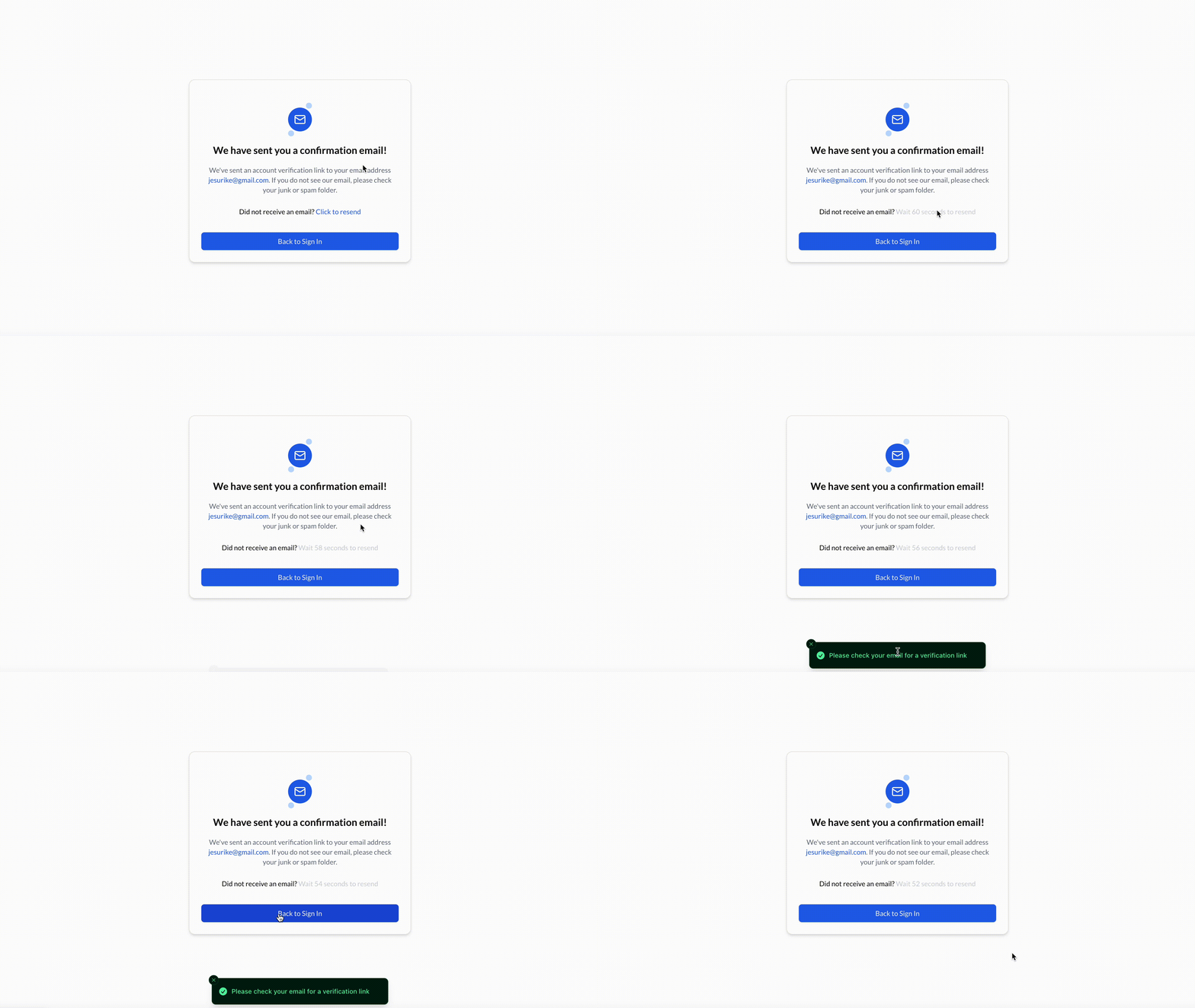
Demo showing the verification action performed
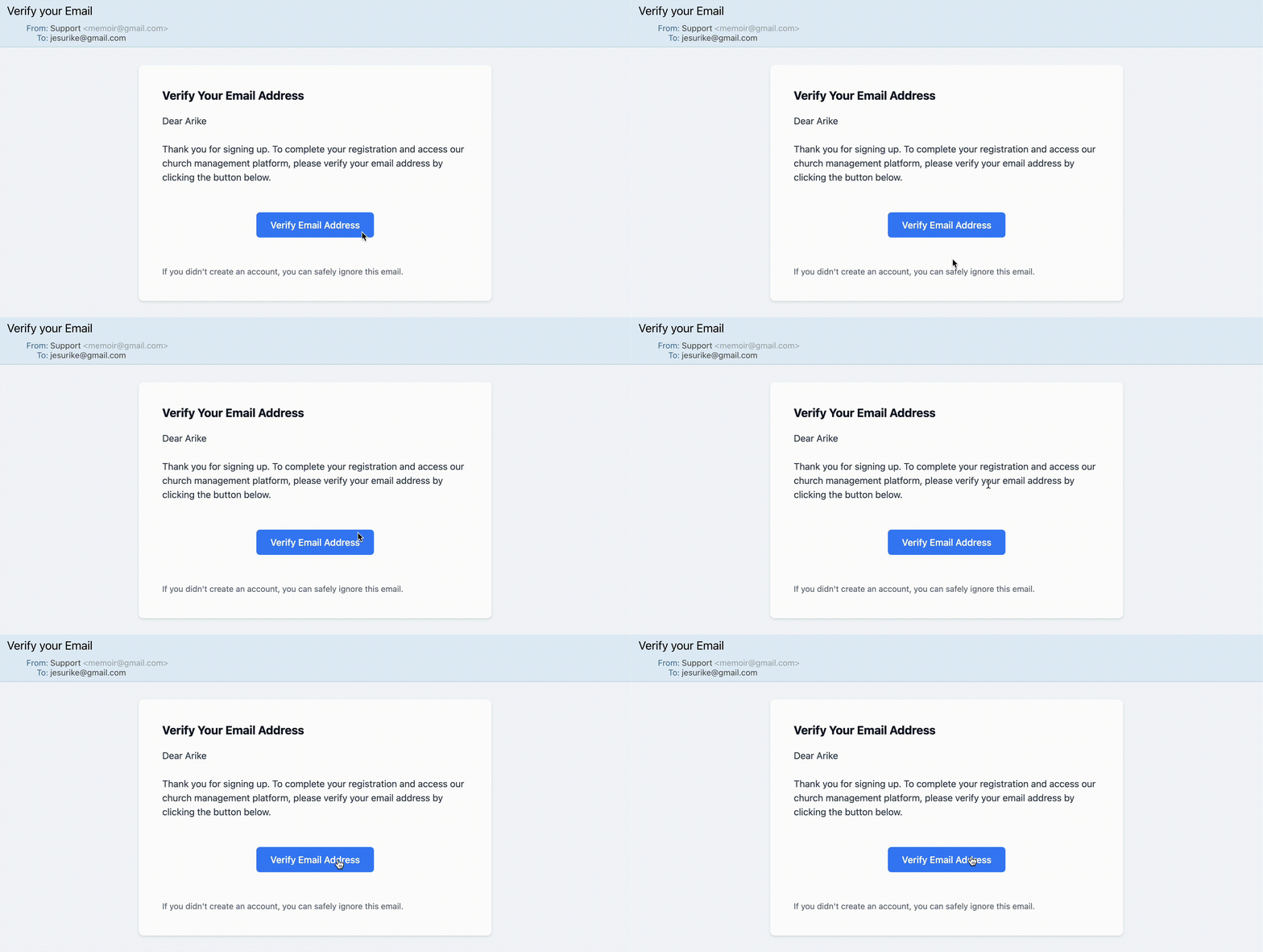
Demo showing the email verification process — in user mailbox
Final Thoughts: Locking In, Like You Mean It
So yeah, there you have it. From yapping without filters to finally learning how to pause, process, and speak with intention. Just like in life, the loudest server isn't the wisest. It's the one that knows when to hold back, when to validate, and when to act with purpose.
That's what next-safe-action gives you.
It's not just some fancy abstraction. It's a mindset shift. A way to make sure your server isn't just reacting, but thinking. A way to build trust with your users because your app's not out here doing the most when nobody asked.
Whether it's sending verification emails or handling critical flows, you've now got the tools to move with confidence. You're no longer hoping your backend behaves — you know it will, because you locked it in.
So next time you're building out that shiny new feature, remember: Don't just let your server yap. Teach it to listen. Teach it to think. And when it's ready — let it speak with purpose.
Explore More, Tweak, Play:
- 🛠 Next Safe Action Playground — Try it out in real time. Break it. Fix it. Repeat.
- 📘 Official Docs — Everything you need to know, from setup to best practices.
- 🧠 GitHub — Dive into the code, contribute, or just peep how it works under the hood.
- 🔐 Real-world example: IQ Wiki — The world's largest crypto encyclopedia, running safe and locked in.
Happy building. And remember, talk less, lock in more.