What "runtime" means in Panda
Oct 28, 2026 · 7min
What actually ships to the browser when you use Panda.

An interlude in the Panda internals series, between part 4 and part 5. Call it the series' OVA. I've had to explain what "runtime" means in Panda more than once, so this one clears it up before we go deeper.
The question comes up every time Panda is compared to another styling library: does it have a runtime?
Yes. A small one. It never creates CSS.
Both halves of that answer matter, and people usually only hear one of them. "It has a runtime" turns into "it's CSS-in-JS like Emotion". "It's build time" turns into "nothing ships". Neither is right. Here's what does ship.
Three things by default
Take one component:
import { css } from '../styled-system/css'

export function Title() {
  return <h1 className={css({ color: 'red.300', fontSize: '2xl' })}>Hi</h1>
}
With Panda's default setup, three things reach the browser.
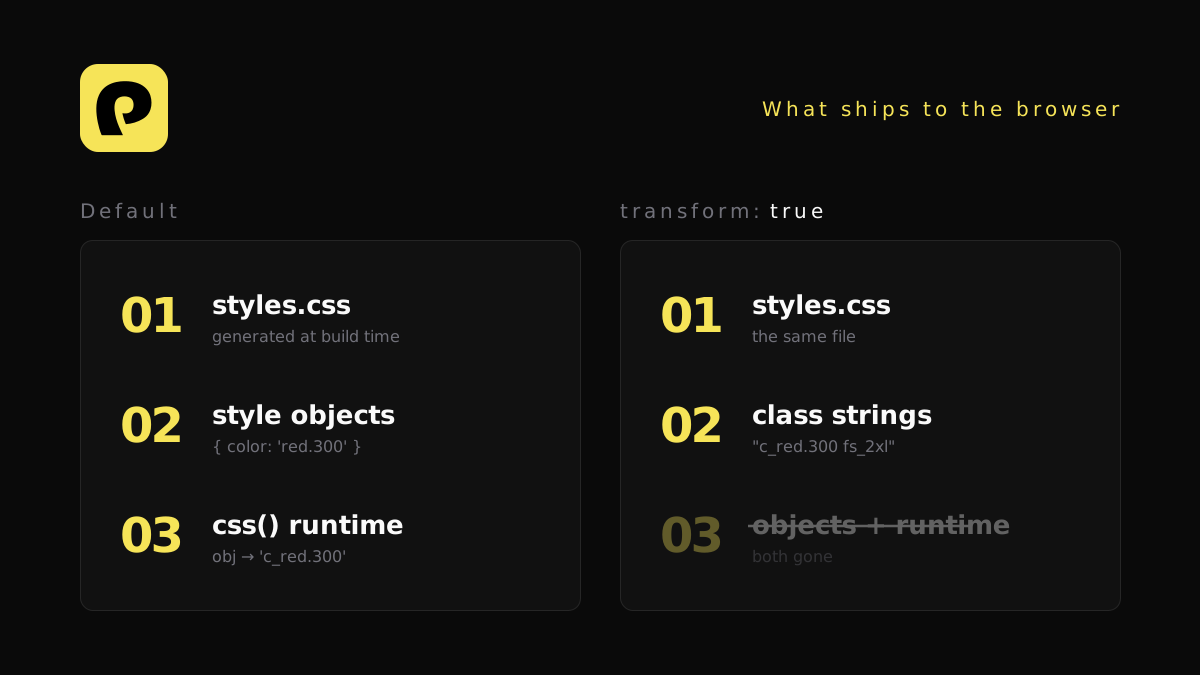
1. A stylesheet. Panda generates CSS at build time and writes it to a real .css file. You load it like any other stylesheet. The rules for color: red.300 and fontSize: 2xl are in there before your app starts.
2. Your style objects. { color: 'red.300', fontSize: '2xl' } is an argument in your component code, so it stays in your JavaScript bundle. Panda extracted it for the stylesheet, but it didn't remove it from your source.
3. The css() function. It takes that object and returns class names:
'c_red.300 fs_2xl'
To do that, it walks the object, resolves shorthands, sorts conditions and builds each name from a small table of utility names that Panda generates into styled-system/css.
So when someone says Panda leaves styles in your bundle, they're right about the objects. The CSS is a different story.
What the runtime never does
The css() function doesn't generate CSS. It doesn't inject a <style> tag or touch the DOM. It builds strings that point at rules the stylesheet already has.
That's the line between Panda and runtime CSS-in-JS. Emotion and styled-components generate CSS in the browser and insert it while your app renders. Panda did that work during the build, so all the browser does is look up the class names.
There's one opt-in exception. If you use multiple themes and load one on demand, injectTheme puts that theme's CSS into a <style> tag. Even then, the CSS was generated at build time. The browser only inserts it.
Removing the runtime
In v2, you can remove the last two items as well. Turn on source transforms with transform: true on the bundler plugin:
import pandacss from '@pandacss/vite'

export default defineConfig({
  plugins: [pandacss({ transform: true })],
})
The same option works on the webpack, Rollup and Bun plugins. Rspack and Rolldown go through the webpack and Rollup ones.
With it on, the bundler rewrites each call to the class string Panda already worked out:
// you write
<h1 className={css({ color: 'red.300', fontSize: '2xl' })}>Hi</h1>

// your bundle ships
<h1 className="c_red.300 fs_2xl">Hi</h1>
The object is gone, and so is the call. Pattern calls, recipe calls and style props on the styled factory get the same treatment. <Stack gap="4"> becomes a plain <div> with a class string.
A few things stay:
- Calls Panda can't resolve. If a value only exists at runtime, the call keeps its runtime form. That's by design. Part 4 covers what Panda can follow and where it stops.
- Joins with your own class names. When a call site mixes Panda styles with a class from somewhere else, Panda rewrites what it can and joins the rest. Where the merge needs real conflict resolution, it imports
cxfrom yourstyled-system. - Turbopack. It has no plugin API, so there's no Turbopack adapter yet. On Next.js 16, that means running
next dev --webpackandnext build --webpack, or keeping transforms off. There's also an unofficial workaround, below.
An unofficial Turbopack workaround
Turbopack can't take a plugin, but it does run loaders, and a loader can rewrite JavaScript. The hard part of a Turbopack adapter is the CSS, and you can skip that entirely: let the Panda CLI write the stylesheet, import it, and leave the bundler only the JavaScript to rewrite.
The loader asks Panda's compiler to transform each file:
// panda-turbopack-loader.cjs
let ready
async function getCompiler(cwd) {
  if (!ready) ready = (async () => {
    const { createNodeDriver } = await import('@pandacss/compiler')
    const driver = await createNodeDriver({ cwd })
    driver.codegen({ cwd })
    driver.parseFiles()
    return driver.compiler ?? driver
  })()
  return ready
}

module.exports = function pandaLoader(source) {
  const callback = this.async()
  const id = this.resourcePath
  ;(async () => {
    const { transformSource, shouldTransform } = await import('@pandacss/transformer')
    if (!shouldTransform(id)) return callback(null, source)
    const compiler = await getCompiler(this.rootContext)
    const result = transformSource({ path: id, source, compiler })
    callback(null, result.changed ? result.code : source, result.map)
  })().catch(callback)
}
// next.config.mjs
export default {
  turbopack: {
    rules: { './app/**/*.tsx': { loaders: ['./panda-turbopack-loader.cjs'] } },
  },
}
Run panda --watch (or panda cssgen before a build) and import styled-system/styles.css in your root layout.
On Next.js 16.4.3 with Panda 2.4.0, a plain next build gives HTML with the final class names in it, and the css() runtime is gone from the client chunks. Leave out the as: '*.tsx' option you'll see in older loader examples. On 16.4 it renames files to card.tsx.tsx and the build fails.
It's unofficial, so know the limits:
cxbrings the runtime back. When a call mixes in a dynamic class name, the loader leavesimport { cx } from '../styled-system/css'. That file also sets upcss(), so the whole runtime ships again. The same component built with the Vite plugin ships without it.- Only builds were tested. Dev mode and hot reload weren't.
- Each build worker starts its own Panda. Next runs several, and each one loads the compiler.
The numbers
I built a small Preact app with Vite and Panda 2.4.0, using the default presets. Preact is small enough that Panda's share of the bundle is easy to see. Each component has four css() calls, with hover, focus and responsive styles, and one ternary.
All sizes are gzipped:
| JS | Transforms off | Transforms on |
|---|---|---|
| Preact alone, no Panda | 5.1 kB | 5.1 kB |
| 1 component | 11.8 kB | 5.3 kB |
| 40 components | 13.0 kB | 6.5 kB |
The stylesheet for 40 components was 7.0 kB both times.
A few things stand out:
- The stylesheet didn't change. Same file, same hash. The transform only touches JavaScript.
- The saving is fixed. About 6.4 kB goes with one component, and about the same with forty. That's the runtime leaving.
- With transforms on, Panda costs almost nothing in JS. One component adds 0.2 kB over plain Preact. That's the class strings.
- Objects compress well. Going from 1 to 40 components adds 1.2 kB either way. The strings that replace the objects compress about as well as the objects did.
- Neither build injects CSS. No
insertRule, no<style>element, with transforms on or off.
The ternary is worth a look too. color: active ? 'red.700' : 'gray.700' didn't stay a runtime call. It became a ternary between two finished strings:
className: e ? `c_red.700 fs_xl fw_bold lh_tight` : `c_gray.700 fs_xl fw_bold lh_tight`
Should you turn it on?
The win is real but fixed: a few kilobytes gzipped, and it doesn't grow much with your app. Your numbers will differ, so measure your own bundle before and after. If you're on Turbopack, or a lot of your css() calls depend on runtime values, leaving it off is fine. Your CSS is still generated at build time either way.
The short version
Next time someone asks, here's the whole answer:
Panda generates all your CSS at build time. By default, your style objects and a small
css()function ship to the browser, and that function only turns objects into class names. It never creates CSS. Turn on source transforms and those are replaced with plain strings at build time.
If you want the full trip a css() call takes through the build, start with Build once, at build time.