The IR behind your ternary
What Panda builds from your style before it writes a single class.

Panda internals, part 5. Start with Build once, at build time if you're new here.
Part 4 ended on a promise. With source transforms on, this call:
css({ fontSize: 'xl', color: active ? 'red.700' : 'gray.700' })
ships to the browser as this:
active ? "c_red.700 fs_xl" : "c_gray.700 fs_xl"
Two finished class strings and the condition you wrote. No css() call left.
To get there, Panda doesn't go straight from your code to class names. It builds something in between first.
Just want the habits? Skip to what this means for your code.
Something in between
Compilers rarely turn their input straight into output. They first turn it into a model of the program that's easier to work with, then generate output from that model. The model is called an intermediate representation, or IR.
Panda has one for styles. It's called the StyleTree, and every style call gets one.
The reason Panda needs it is that one style can produce two outputs. There's the stylesheet, which every Panda project gets. And with source transforms on, there's your rewritten code. Both have to agree on what your style means, so both are built from the same tree.
The shapes in the tree
A StyleTree node is one of a few shapes. Written as TypeScript, it looks roughly like this:
type StyleTree =
  | string | number | boolean | null
  | { token: string }
  | { [key: string]: StyleTree }
  | StyleTree[]
  | { branches: StyleTree[] }
  | { ternary: Source, consequent: StyleTree, alternate: StyleTree }
  | { and: Source, value: StyleTree }
  | { open: true }
  | { open: true, fallback: StyleTree }
Most of it is plain values. The interesting shapes are the last five:
- Ternary keeps both sides. The condition itself isn't stored as a value. Panda keeps a pointer to where it sits in your source, so it can copy it out later.
- And is
condition && value. - Branches holds alternatives with no condition to point at, like a conditional value imported from another file.
- Open means Panda can't know this value at build time.
- Open with a fallback means Panda can't know the value, but it knows what to fall back to.
Conditions like _hover and md aren't special nodes. They're ordinary nested objects, so a ternary inside _hover just lives one level deeper, at _hover → color.
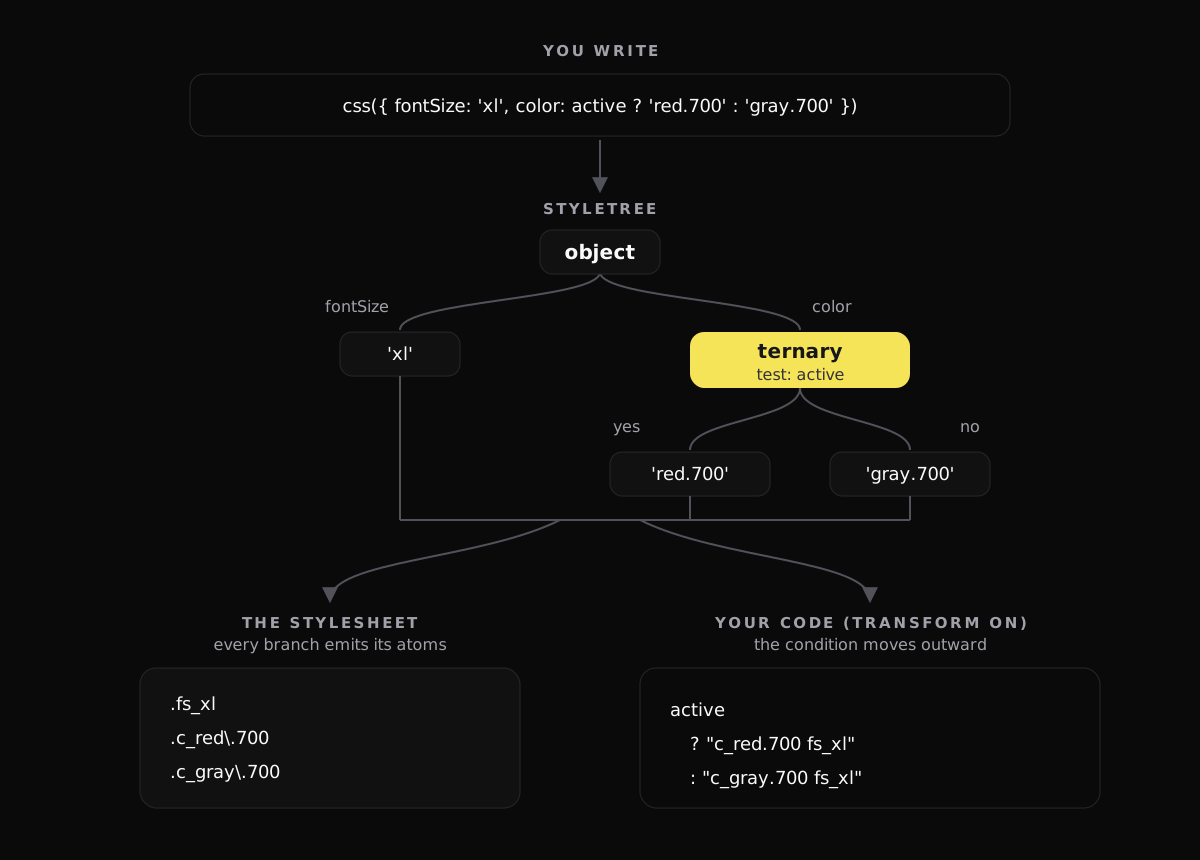
Here's the running example as a tree:
How your code becomes branches
Part 4 covered how Panda works out values without running your code. The StyleTree is where that work lands.
When Panda can work out a ternary's condition at build time, it picks the matching side and stores only that. No ternary ends up in the tree.
When the condition depends on runtime, like active here, it keeps both sides in a ternary node.
The logical operators split two ways:
active && valuebecomes an And node.a ?? banda || b, with a left side Panda can't know, become Open with a fallback, wherebis the fallback.
That last rule is the answer to part 4's opening puzzle. colorByType[type] ?? 'gray.100' is an open value with 'gray.100' as its fallback. So gray.100 is the only color Panda ever sees.
Output one: the stylesheet
To generate CSS, Panda flattens the tree into the atoms from part 2. Every branch gets its atoms emitted, because Panda can't know which one will run.
So the running example produces three atoms:
.fs_xl { font-size: var(--font-sizes-xl) }
.c_red\.700 { color: var(--colors-red-700) }
.c_gray\.700 { color: var(--colors-gray-700) }
For the other shapes:
- An And node emits its value.
- An open node with a fallback emits the fallback.
- An open node without one emits nothing, since there's nothing to emit.
This is the same for every Panda project, with or without source transforms.
Output two: your code
With source transforms on, the bundler plugin walks the same tree and rewrites the call.
It looks for each place in the tree that holds a condition. Then it moves the condition outward, to the edge of the whole call. Each branch gets the static styles plus its own value, and becomes a complete class string. That's how the opening call became active ? "c_red.700 fs_xl" : "c_gray.700 fs_xl".
fs_xl appears in both strings, because each one has to be complete on its own.
Conditions nested under _hover work the same way:
// you write
css({ fontSize: 'xl', _hover: { color: active ? 'red.700' : 'gray.700' } })

// your bundle ships
active ? "fs_xl hover:c_red.700" : "fs_xl hover:c_gray.700"
And a conditional spread is just a ternary with an empty side:
// you write
css({ fontSize: 'xl', ...(active && { color: 'red.700' }) })

// your bundle ships
active ? "c_red.700 fs_xl" : "fs_xl"
Two conditions, not four strings
Add a second condition and you might expect four strings, one for every combination. That's not what happens:
// you write
css({
  fontSize: 'xl',
  color: active ? 'red.700' : 'gray.700',
  padding: compact ? '2' : '4',
})

// your bundle ships
"fs_xl" + " " + (active ? "c_red.700" : "c_gray.700") + " " + (compact ? "p_2" : "p_4")
Each condition gets its own small ternary, and the pieces are joined. Atoms that every branch shares, like fs_xl here, are pulled out and written once. Each new condition adds one ternary, so the output grows linearly.
That works because each atom is independent. color doesn't care what padding is.
When it does multiply
Recipes are different, and so are patterns with default values. A recipe's default variants and compound variants depend on the whole selection, not one variant at a time. So for these, Panda builds every combination as a decision tree:
// you write
badge({ tone: danger ? 'danger' : 'neutral', size: big ? 'lg' : 'sm' })

// your bundle ships
"badge" + " " + (danger
  ? (big ? "badge--tone_danger badge--size_lg" : "badge--tone_danger badge--size_sm")
  : big ? "badge--tone_neutral badge--size_lg" : "badge--tone_neutral badge--size_sm")
That gets big fast. Two conditions make four strings, five make thirty-two, and every one of them is a full class string. At some point the rewrite stops paying off: the strings Panda would inline end up bigger than the short recipe call they replace. So Panda caps it at 16 combinations. A recipe call with more than that stays a runtime call, which is the smaller option.
There's also a separate cap for any single call: past 64 conditional sites, Panda doesn't rewrite it at all.
When the tree has an unknown in it
A call can't become a fixed string if some value in it is open. But Panda doesn't give up on the whole call. It rewrites what it can and leaves only the unknown part to the runtime:
// you write
css({ fontSize: 'xl', width: props.width })

// your bundle ships
__pcx("fs_xl", css({ width: props.width }))
__pcx is a tiny helper the transform imports to join the two halves.
Property-level && lands in the same place:
// you write
css({ fontSize: 'xl', color: active && 'red.700' })

// your bundle ships
__pcx("fs_xl", css({ color: active && 'red.700' }))
The spread version above did get rewritten, so why not this one? The difference is the falsy side. active && { color: 'red.700' } is either an object or nothing to merge. But active && 'red.700' evaluates to whatever active is when it's falsy: false, 0, an empty string. Panda can't turn an unknown value like that into a fixed class, so it hands it to the runtime.
Two more cases keep the whole call at runtime:
- Two conditions writing the same property. In an object, the last write wins. Separate atomic classes can't express "the last one wins", so Panda leaves the call alone.
- Conditions that live in another file. When a conditional value comes through an import, Panda knows both branches, so the stylesheet still gets both. But the condition itself is in the other file, so there's nothing local to copy into the rewrite.
What this means for your code
Most of this happens without you thinking about it. A few habits keep more calls fully rewritten:
- Ternaries and conditional spreads compile away. Prefer
...(active && { color: 'red.700' })oractive ? 'red.700' : undefinedovercolor: active && 'red.700'. ??and||on a runtime value keep that value at runtime. Only the fallback gets CSS. If you know all the possible values, use a recipe or a lookup that Panda can read.- Keep the condition next to the call. A condition imported from another file still gets its CSS, but not the rewrite.
- Give runtime values their own property. Everything else in the call still becomes classes.
- One variant beats five booleans. A recipe with many conditional variants can hit the 16-combination cap. A single variant with several values doesn't multiply.
None of these are required. A call that can't be rewritten still works, it just keeps its runtime form.
One tree, two outputs
Both outputs come from one model of your style, so they always agree.
Next in the series: how Panda makes variants fast, and what cva and sva do with the same combination logic. If you missed the earlier parts: Build once, at build time, Every style is an atom, Look it up once, Panda never runs your code, What runtime means in Panda.